Document Contribution Guide
This document describes how to contribute to the Capa documentation repository. The documentation is written in Markdown syntax and published to capa-cloud/capa.io.
Prerequisites
The Capa documentation repository is built using Hugo with the Docsy theme.
Documentation Development Steps
Standards and Conventions
- Ensure that the files you contribute are in the correct position in the hierarchy.
- Ensure that your contributed content is consistent in terms of names, parameters, and terminology.
- Ensure that any contributed content can be successfully built on the website.
- Ensure that readers can understand why they should care about the contributed content and what problems it can solve for them.
Document Path Instructions
File Path Instructions
Files are uniformly placed in the content/ directory, with Chinese documents stored in content/zh and English documents stored in content/en.
If you need to add new documents, you must create new folders and .md files according to the directory structure.
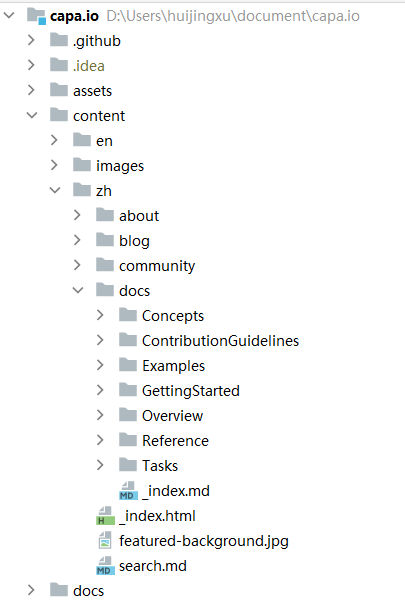
Image Path Instructions
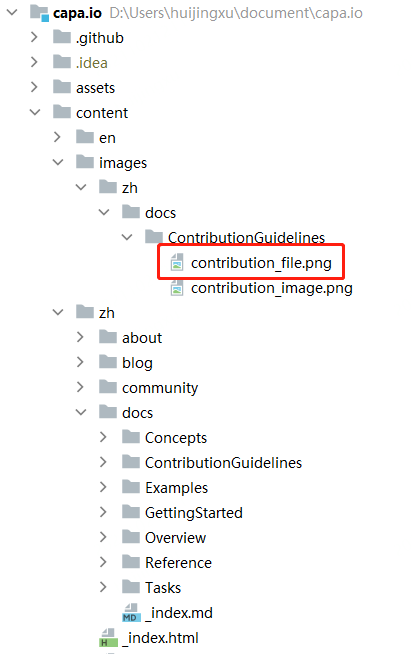
Images are uniformly placed in the content/images/ directory, with the image directory structure consistent with the directory of the referenced md file. Choose clear images that are compatible with the background.
The document uniformly uses full paths to reference images, with the URL prefix https://raw.githubusercontent.com/capa-cloud/capa.io/master/content/images.
For example, to include the image below (contribution_file.png), the Markdown syntax is as follows:

masterindicates the branch namecontent/images/zh/docs/ContributionGuidelines/contribution_file.pngindicates the relative path of the image
Feedback
Was this page helpful?
Glad to hear it! Please tell us how we can improve.
Sorry to hear that. Please tell us how we can improve.