Thank you for your support of Capa!
This is the multi-page printable view of this section. Click here to print.
Contribution Guidelines
How to contribute to Capa.
1 - Contributor Guide
General guidelines for contributing to any Capa project repository.
Capa is released under the Apache 2.0 license and follows the standard GitHub development process. This document describes how to contribute to Capa using GitHub Issues and Pull Requests.
Issue Conventions
- Question: Ask a question about Capa
- Feature Request: Request a new feature for Capa
- Bug Report: Report a bug in Capa
- Discussion: Discuss Capa-related topics
- Proposal: Propose changes or enhancements to Capa
Coding Standards
- All submitted code must include the Apache License (can be detected via checkstyle plugin)
- Only one commit is allowed per submission; if there are multiple, rebase them into a single commit locally
- It is recommended that one commit should only resolve one issue
- Commits must include detailed descriptions, all written in English
- Code that fails the CI Pipeline build will not enter the Code Review stage
- The repository has only one main branch (master branch)
- Code on the main branch can only be advanced through Merge PR (MR)
- All implemented features must have complete usage documentation
- Packages referenced only in UT must have test scope
- Each issue must first have an Issue submitted
Unit Testing Standards
- Unit tests should use JUnit and Mockito
- Follow the AIR principles:
- Automatic: Unit tests should be fully automated and non-interactive. Test cases are usually executed regularly and must be completely automated.
- Independent: Keep unit tests independent. To ensure unit tests are stable, reliable, and easy to maintain, unit test cases must never call each other or depend on execution order.
- Repeatable: Unit tests should be repeatable and not affected by external environments.
- Keep unit test cases running fast; don’t put large integration test cases in unit tests
- UT class naming convention:
BeTestedClassTest
   Example:
   Source class full name: com.api.Matching
   Source file path: src/main/java/com/api/Matching.java
   UT file path: src/test/java/com/api/MatchingTest.java
- UT method naming convention:
   Example:
   Source method name: matching()
   UT method name: testMatching_Success() / testMatching_SuccessWhenResultGreaterThanZero() / testMatching_FailWhenThrowException()
Commit Conventions
- Commit style:
 <type>(<scope>): <subject>
 <BLANK LINE>
 <body>
 <BLANK LINE>
 <footer>
- Commit type:
- feat: New feature
- fix: Bug fix
- docs: Documentation changes only, such as README, CHANGELOG, CONTRIBUTE, etc.
- style: Formatting changes only, such as spaces, indentation, commas, etc., without changing code logic
- refactor: Code refactoring, without adding new features or fixing bugs
- perf: Performance optimization, such as improving performance or experience
- test: Test cases, including unit tests, integration tests, etc.
- chore: Changes to build process, or adding dependencies, tools, etc.
- revert: Revert to the previous version
- Commit scope: The scope of the submitted code (optional)
- Commit subject: Within 50 characters, describing the main changes (required)
- Commit body: More detailed description, recommended within 72 characters (required)
- Commit footer: If needed, can add a link to the issue address or other documents, or close an issue (optional)
2 - Document Contribution Guide
Guide for contributing to Capa documentation.
This document describes how to contribute to the Capa documentation repository. The documentation is written in Markdown syntax and published to capa-cloud/capa.io.
Prerequisites
The Capa documentation repository is built using Hugo with the Docsy theme.
Documentation Development Steps
Standards and Conventions
- Ensure that the files you contribute are in the correct position in the hierarchy.
- Ensure that your contributed content is consistent in terms of names, parameters, and terminology.
- Ensure that any contributed content can be successfully built on the website.
- Ensure that readers can understand why they should care about the contributed content and what problems it can solve for them.
Document Path Instructions
File Path Instructions
Files are uniformly placed in the content/ directory, with Chinese documents stored in content/zh and English documents stored in content/en.
If you need to add new documents, you must create new folders and .md files according to the directory structure.
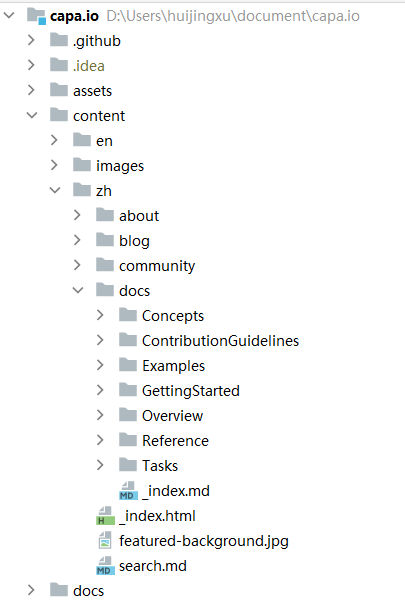
Image Path Instructions
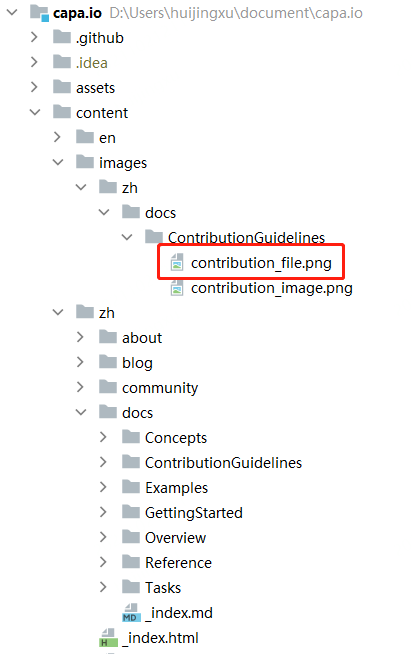
Images are uniformly placed in the content/images/ directory, with the image directory structure consistent with the directory of the referenced md file. Choose clear images that are compatible with the background.
The document uniformly uses full paths to reference images, with the URL prefix https://raw.githubusercontent.com/capa-cloud/capa.io/master/content/images.
For example, to include the image below (contribution_file.png), the Markdown syntax is as follows:

masterindicates the branch namecontent/images/zh/docs/ContributionGuidelines/contribution_file.pngindicates the relative path of the image