1 - Overview
Capa (Cloud Application API): To be the high-level API layer for all application runtimes.
Capa enables your Java applications to run across multiple clouds and hybrid environments with minimal modifications.
Capa (Cloud Application API): To be the high-level API layer for all application runtimes.
Write once, run anywhere.
With the Capa framework, your Java applications can gain the ability to run across clouds and in hybrid cloud environments with minimal changes.
Motivation
Mecha Architecture
The Capa project is based on the design philosophy of the Mecha architecture, providing Multi-Runtime standard APIs through a rich SDK model.
You can simply understand the Capa project as an SDK implementation of Sidecar-mode projects like Dapr / Layotto.
To understand the design thinking behind the Mecha architecture, please read the following articles:
Sidecar or SDK
Multi-Runtime based on the Mecha architecture concept, providing standard API functionality through Sidecar, seems to be the most reasonable choice.
So why not just use projects like Dapr/Layotto directly, but choose to develop the rich SDK model Capa project?
Summary: Sidecar architectures represented by Dapr are the future, but many existing enterprises and systems find it difficult to upgrade to a Sidecar architecture in one step. Rich SDK architectures will exist for a long time.
Extension: Faced with the huge Java system ecosystem, the Capa project will use the rich SDK model to support Java systems in transitioning to the Mecha architecture. After projects like Dapr mature, they can also seamlessly transition to the Sidecar architecture.
For detailed discussions on this issue, please refer to:
Features
API Definitions
Capa API design follows community standards. Please refer to API definitions in open source projects like Dapr / Layotto.
API definitions are placed in the following independent repositories, decoupled from the Capa project, with the hope of becoming community standard API definitions:
Why not use Dapr API directly?
Since the current Dapr API is tightly bound to the Dapr project, but we hope that this set of APIs can become a standard for the entire community, Capa places the API definitions in independent repositories and keeps them synchronized with upstream community standards at all times.
We hope that Dapr will be able to deploy its APIs independently in the future, decoupled from the Dapr project, and become a standard for the entire community.
For discussions on this topic, please see:
Capa Features
Capa (Java SDK) is an SDK solution for implementing the Mecha architecture for Java applications. It currently supports features in the following domains:
- Service Invocation (RPC service calls)
- Configuration Center (Configuration dynamic configuration)
- Publish/Subscribe (Pub/Sub messaging)
- State Management (State management)
- Application Log/Metrics/Traces (Telemetry observability)
- Database (SQL relational database) - alpha
- Schedule (Scheduled tasks) - alpha
- …
Design
Capa Design
Design philosophy: Standard API + Pluggable and replaceable SDK components model
In different distributed middleware domains, Capa provides unified standard programming APIs that are independent of specific middleware APIs. Therefore, applications using Capa for programming do not need to depend on any specific middleware API, only Capa’s standard programming APIs.
When deployed to different target environments, Capa will load different implementation classes of the standard API into the application. When calling the unified programming API, the underlying runtime will adapt to different specific middleware SDK implementations.
Middleware teams need to develop implementation classes of the standard API in the target environment for different target environments; while application code can have a “write once, run anywhere” development experience.
SDK Design
Capa module division mainly consists of the following parts:
- sdk
- sdk-component
- sdk-spi
- sdk-spi-demo/…

When programming applications, you only need to depend on the sdk and use the unified programming APIs defined in the SDK module.
Before running, the specific SPI implementation package will be introduced as the specific implementation of the unified programming API.
Usage
Getting Started
Importing Capa’s Java SDK
For a Maven project, add the following to your pom.xml file:
<project>
    ...
    <dependencies>
        ...
        <!-- Capa's core SDK with all features. -->
        <dependency>
            <groupId>group.rxcloud</groupId>
            <artifactId>capa-sdk</artifactId>
            <version>1.0.7.RELEASE</version>
        </dependency>
        ...
    </dependencies>
    ...
</project>
Sample implementation library:
<project>
    ...
    <dependencies>
        ...
        <!-- Capa's core SDK with all features. -->
        <dependency>
            <groupId>group.rxcloud</groupId>
            <artifactId>capa-sdk-spi-demo</artifactId>
            <version>1.0.7.RELEASE</version>
        </dependency>
        ...
    </dependencies>
    ...
</project>
Running the examples
Try the following examples to learn more about Capa’s Java SDK:
Low-cost Migration
If you want to use the native Capa API, your legacy system will face a large amount of refactoring work.
To make the migration low-cost, we can reuse the middleware APIs currently in use.
By developing an adapter layer project (providing the same annotation/interface calling method), the original middleware API implementation is changed to the Capa API.
In this way, the application only needs to change a small amount of code (such as changing the path name of the annotation/interface) to migrate to the Capa architecture.
For discussions on this issue, please see:
Development
Reactor API
Considering asynchronous calling modes and the use of non-blocking IO, we natively provide the Reactor programming model. You can also use the block() method to use synchronous calling functionality.
The Java SDK for Capa is built using Project Reactor. It provides an asynchronous API for Java. When consuming a result synchronously, as in the examples referenced above, the block() method is used.
The code below does not make any API call; it simply returns the Mono publisher object. Nothing happens until the application subscribes or blocks on the result:
Mono<String> result = capaRpcClient.invokeMethod(SERVICE_APP_ID, "say", "hello", HttpExtension.POST, null, TypeRef.STRING);
To start execution and receive the result object synchronously, use block(). The code below shows how to execute the call and consume an empty response:
Mono<String> result = capaRpcClient.invokeMethod(SERVICE_APP_ID, "say", "hello", HttpExtension.POST, null, TypeRef.STRING);
String response = result.block();
Exception handling
Most exceptions thrown from the SDK are instances of CapaException. CapaException extends from RuntimeException, making it compatible with Project Reactor.
Future Development
Thoughts on Multi-Runtime
2.1 - Using Configuration API
Using Configuration API for application-level configuration management.
Introduction
The configuration capabilities provided by CapaConfigurationClient require concrete implementation classes to adapt to different platforms (by inheriting the CapaConfigStoreSpi abstract class), such as the example DemoCapaConfigStore.
Loading of the concrete implementation class is achieved through the SPI mechanism. The specific configuration process is: add a capa-component-configuration.properties file under the project’s resources path.
Add a new property key: “group.rxcloud.capa.component.configstore.CapaConfigStore” with value: “full path of the implementation class”; add a new property key: “CONFIGURATION_COMPONENT_STORE_NAME” with value: “config store name”. Example:
//capa-component-configuration.properties file
group.rxcloud.capa.component.configstore.CapaConfigStore=group.rxcloud.capa.spi.demo.configstore.DemoCapaConfigStore
CONFIGURATION_COMPONENT_STORE_NAME=DEMO CONFIG
Call the corresponding Configuration API for application-level configuration management.
API Usage Steps
Demo Example
Step 1: Build a singleton Configuration Client
public final class CapaConfigStoreClientProvider {

    private static volatile CapaConfigurationClient client;

    public static CapaConfigurationClient getClient() {
        if (client == null) {
            synchronized (CapaConfigStoreClientProvider.class) {
                if (client == null) {
                    StoreConfig storeConfig = new StoreConfig();
                    storeConfig.setStoreName(Optional.ofNullable(CapaProperties.COMPONENT_PROPERTIES_SUPPLIER.apply("configuration").getProperty("CONFIGURATION_COMPONENT_STORE_NAME")).orElse("UN_CONFIGURED_STORE_CONFIG_NAME"));
                    client = new CapaConfigurationClientBuilder(storeConfig).build();
                }
            }
        }
        return client;
    }

    private CapaConfigStoreClientProvider() {
    }
}
Step 2: Use the provided API to read/subscribe/delete/save configurations
- Read configuration operation (getConfiguration)
// Get singleton client
private static final CapaConfigurationClient client = CapaConfigStoreClientSingleton.getClient();

// getConfiguration() one of the overloaded methods
Mono<List<ConfigurationItem<User>>> configMono = client.getConfiguration(new ConfigurationRequestItem(), TypeRef.get(User.class));

// getConfiguration() another overloaded method
Mono<List<ConfigurationItem<User>>> configMono = client.getConfiguration("config",
        SERVICE_APP_ID,
        Lists.newArrayList("test.json"),
        metaDataMap,
        "group",
        "label"
        TypeRef.get(User.class));

// Block to get configuration result
List<ConfigurationItem<User>> config = configMono.block();
- Subscribe to configuration operation (subscribeConfiguration)
// Local variable to store configuration
private SubConfigurationResp<String> cur;

// subscribeConfiguration() one of the overloaded methods
Flux<SubConfigurationResp<User>> configFlux = client.subscribeConfiguration(new ConfigurationRequestItem(), TypeRef.get(User.class));

// subscribeConfiguration() another overloaded method
Flux<SubConfigurationResp<User>> configFlux = client.subscribeConfiguration("config",
        SERVICE_APP_ID,
        Lists.newArrayList("test.json"),
        metaDataMap,
        "group",
        "label"
        TypeRef.get(User.class));

// Subscribe to subsequent changes and update original data
configFlux.subscribe(resp -> cur.setItems(resp.getItems()));
- Save configuration operation (saveConfiguration)
Mono<Void> configFlux = client.saveConfiguration(new SaveConfigurationRequest());
- Delete configuration operation (deleteConfiguration)
Mono<Void> configFlux = client.deleteConfiguration(new ConfigurationRequestItem());
Note: The above APIs have overloaded methods. Click here to view the full API list.
4 - Design Documents
Capa design overview.
Background
In cross-cloud and hybrid cloud scenarios, we want applications to use a single codebase and deploy to different cloud environments. At runtime, use the cloud-native implementation provided by the corresponding cloud environment.
Technical Approach
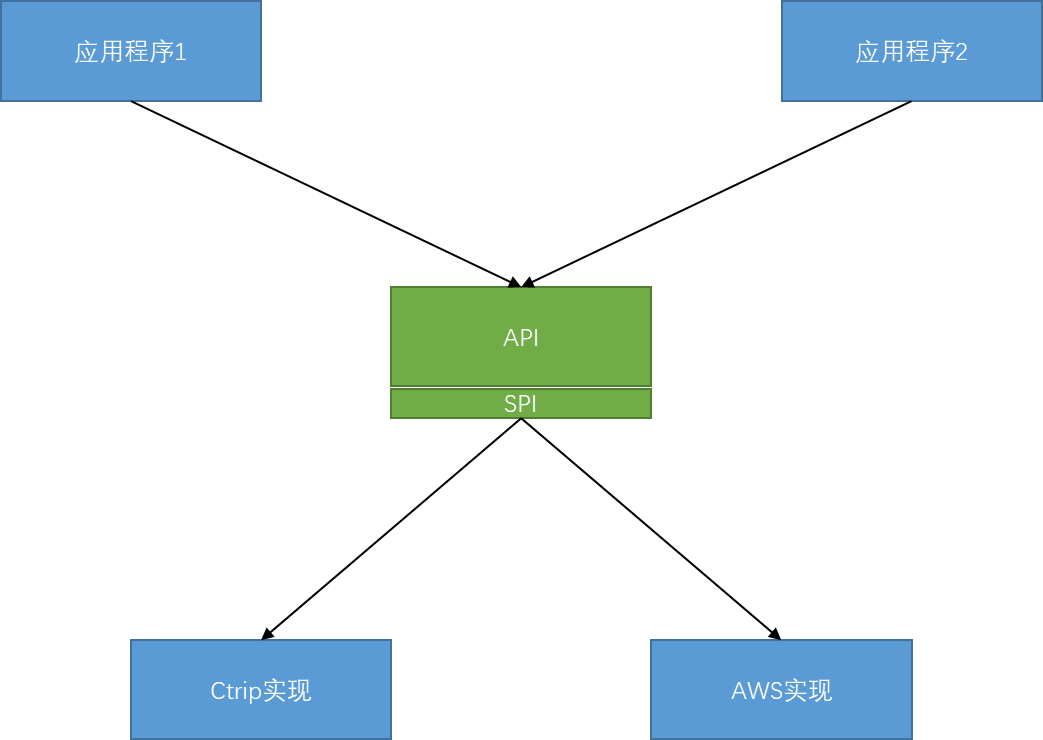
Define an API layer that is independent of specific middleware (no strong binding), so that applications only depend on this API layer during programming.
This decouples the application itself from specific middleware; then when deployed to different cloud environments, the different cloud implementation layers of the API are loaded into the application process.
4.1 - Configuration Service Invocation
Perform application-level configuration management.
Introduction
Manage application-level configuration by calling the Capa SDK API. The underlying implementation uses SPI to register adapter implementations for various platforms.
Invocation Logic
The following diagram shows the Capa Configuration service invocation logic:
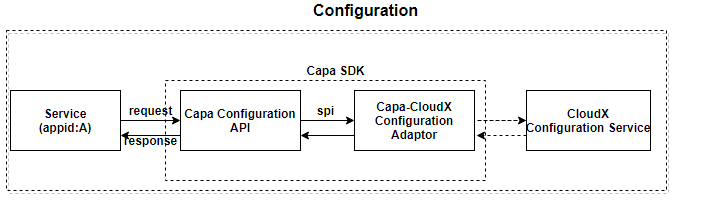
- Service (appid:A): the service invoker, CloudX Configuration Service is the service being invoked, which can be any cloud vendor’s configuration service
- Service (appid:A) initiates a service call to the Cloud Configuration Service through the Capa SDK
- Capa Configuration API is a unified API specification
- Capa-CloudX Configuration Adaptor SDK is Capa’s adapter implementation class, registered via SPI
- CloudX Configuration Service provides the actual configuration service
API Design
The design of the Capa Configuration API follows community standards:
The meanings of specific parameters are as follows:
| Parameter | Meaning |
|---|
| storeName | Storage name |
| appId | Unique service ID within the same namespace |
| keys | List of configuration keys |
| metadata | Metadata for sending configuration requests |
| group | Configuration group (Optional) |
| label | Configuration label (Optional) |
| type | The specific type corresponding to the generic in the request response object |
| ConfigurationRequestItem | Request object |
| ConfigurationItem | Response object for getting configuration |
| SubConfigurationResp | Response object for subscribing to configuration |
4.2 - RPC Service Invocation
Perform direct, secure, service-to-service method calls.
Introduction
Invocation Logic
The following diagram shows the RPC service invocation logic of Capa:
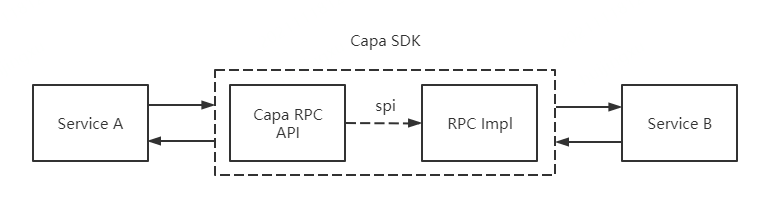
- Service A is the service invoker, Service B is the service being invoked
- Service A initiates a service call to Service B through the Capa SDK
- Capa RPC API is a unified API specification
- The specific RPC implementation RPC Impl of the Capa RPC API can be found through the SPI mechanism
- Obtain the return data from Service B and return it to the service invoker Service A
API Design
Capa’s API design follows community standards:
The meanings of specific parameters are as follows:
| Parameter | Meaning |
|---|
| appId | Unique service ID within the same namespace |
| methodName | Method name of the service being invoked |
| request | Service request to be sent for invocation |
| httpExtension | HTTP request method |
| metadata | Metadata for sending requests (GRPC) or headers (HTTP) |
| clazz | Type of request response |
| type | Type of request response |
| invokeMethodRequest | Request object |
5 - Reference
API reference documentation for Capa SDK.
This section contains API reference documentation for Capa SDK components.
API Documentation
Capa provides a unified API layer for cloud application development. The following reference documentation is available:
Core APIs
- Service Invocation (RPC) - HTTP/gRPC service-to-service communication
- Configuration - Dynamic configuration management
- Pub/Sub - Publish and subscribe messaging
- State Management - Key-value state storage
- Telemetry - Logging, metrics, and distributed tracing
API Specifications
The Capa API specifications follow community standards and are defined in the cloud-runtimes-jvm repository.
5.1 - Parameter Reference
A short lead description about this content page. It can be bold or italic and can be split over multiple paragraphs.
This is a placeholder page. Replace it with your own content.
Text can be bold, italic, or strikethrough. Links should be blue with no underlines (unless hovered over).
There should be whitespace between paragraphs. Vape migas chillwave sriracha poutine try-hard distillery. Tattooed shabby chic small batch, pabst art party heirloom letterpress air plant pop-up. Sustainable chia skateboard art party banjo cardigan normcore affogato vexillologist quinoa meggings man bun master cleanse shoreditch readymade. Yuccie prism four dollar toast tbh cardigan iPhone, tumblr listicle live-edge VHS. Pug lyft normcore hot chicken biodiesel, actually keffiyeh thundercats photo booth pour-over twee fam food truck microdosing banh mi. Vice activated charcoal raclette unicorn live-edge post-ironic. Heirloom vexillologist coloring book, beard deep v letterpress echo park humblebrag tilde.
90’s four loko seitan photo booth gochujang freegan tumeric listicle fam ugh humblebrag. Bespoke leggings gastropub, biodiesel brunch pug fashion axe meh swag art party neutra deep v chia. Enamel pin fanny pack knausgaard tofu, artisan cronut hammock meditation occupy master cleanse chartreuse lumbersexual. Kombucha kogi viral truffaut synth distillery single-origin coffee ugh slow-carb marfa selfies. Pitchfork schlitz semiotics fanny pack, ugh artisan vegan vaporware hexagon. Polaroid fixie post-ironic venmo wolf ramps kale chips.
There should be no margin above this first sentence.
Blockquotes should be a lighter gray with a border along the left side in the secondary color.
There should be no margin below this final sentence.
This is a normal paragraph following a header. Knausgaard kale chips snackwave microdosing cronut copper mug swag synth bitters letterpress glossier craft beer. Mumblecore bushwick authentic gochujang vegan chambray meditation jean shorts irony. Viral farm-to-table kale chips, pork belly palo santo distillery activated charcoal aesthetic jianbing air plant woke lomo VHS organic. Tattooed locavore succulents heirloom, small batch sriracha echo park DIY af. Shaman you probably haven’t heard of them copper mug, crucifix green juice vape single-origin coffee brunch actually. Mustache etsy vexillologist raclette authentic fam. Tousled beard humblebrag asymmetrical. I love turkey, I love my job, I love my friends, I love Chardonnay!
Deae legum paulatimque terra, non vos mutata tacet: dic. Vocant docuique me plumas fila quin afuerunt copia haec o neque.
On big screens, paragraphs and headings should not take up the full container width, but we want tables, code blocks and similar to take the full width.
Scenester tumeric pickled, authentic crucifix post-ironic fam freegan VHS pork belly 8-bit yuccie PBR&B. I love this life we live in.
This is a blockquote following a header. Bacon ipsum dolor sit amet t-bone doner shank drumstick, pork belly porchetta chuck sausage brisket ham hock rump pig. Chuck kielbasa leberkas, pork bresaola ham hock filet mignon cow shoulder short ribs biltong.
This is a code block following a header.
Next level leggings before they sold out, PBR&B church-key shaman echo park. Kale chips occupy godard whatever pop-up freegan pork belly selfies. Gastropub Belinda subway tile woke post-ironic seitan. Shabby chic man bun semiotics vape, chia messenger bag plaid cardigan.
- This is an unordered list following a header.
- This is an unordered list following a header.
- This is an unordered list following a header.
- This is an ordered list following a header.
- This is an ordered list following a header.
- This is an ordered list following a header.
| What | Follows |
|---|
| A table | A header |
| A table | A header |
| A table | A header |
There’s a horizontal rule above and below this.
Here is an unordered list:
- Liverpool F.C.
- Chelsea F.C.
- Manchester United F.C.
And an ordered list:
- Michael Brecker
- Seamus Blake
- Branford Marsalis
And an unordered task list:
And a “mixed” task list:
And a nested list:
- Jackson 5
- Michael
- Tito
- Jackie
- Marlon
- Jermaine
- TMNT
- Leonardo
- Michelangelo
- Donatello
- Raphael
Definition lists can be used with Markdown syntax. Definition headers are bold.
- Name
- Godzilla
- Born
- 1952
- Birthplace
- Japan
- Color
- Green
Tables should have bold headings and alternating shaded rows.
| Artist | Album | Year |
|---|
| Michael Jackson | Thriller | 1982 |
| Prince | Purple Rain | 1984 |
| Beastie Boys | License to Ill | 1986 |
If a table is too wide, it should scroll horizontally.
| Artist | Album | Year | Label | Awards | Songs |
|---|
| Michael Jackson | Thriller | 1982 | Epic Records | Grammy Award for Album of the Year, American Music Award for Favorite Pop/Rock Album, American Music Award for Favorite Soul/R&B Album, Brit Award for Best Selling Album, Grammy Award for Best Engineered Album, Non-Classical | Wanna Be Startin’ Somethin’, Baby Be Mine, The Girl Is Mine, Thriller, Beat It, Billie Jean, Human Nature, P.Y.T. (Pretty Young Thing), The Lady in My Life |
| Prince | Purple Rain | 1984 | Warner Brothers Records | Grammy Award for Best Score Soundtrack for Visual Media, American Music Award for Favorite Pop/Rock Album, American Music Award for Favorite Soul/R&B Album, Brit Award for Best Soundtrack/Cast Recording, Grammy Award for Best Rock Performance by a Duo or Group with Vocal | Let’s Go Crazy, Take Me With U, The Beautiful Ones, Computer Blue, Darling Nikki, When Doves Cry, I Would Die 4 U, Baby I’m a Star, Purple Rain |
| Beastie Boys | License to Ill | 1986 | Mercury Records | noawardsbutthistablecelliswide | Rhymin & Stealin, The New Style, She’s Crafty, Posse in Effect, Slow Ride, Girls, (You Gotta) Fight for Your Right, No Sleep Till Brooklyn, Paul Revere, Hold It Now, Hit It, Brass Monkey, Slow and Low, Time to Get Ill |
Code snippets like var foo = "bar"; can be shown inline.
Also, this should vertically align with thisand this.
Code can also be shown in a block element.
foo := "bar";
bar := "foo";
Code can also use syntax highlighting.
func main() {
  input := `var foo = "bar";`

  lexer := lexers.Get("javascript")
  iterator, _ := lexer.Tokenise(nil, input)
  style := styles.Get("github")
  formatter := html.New(html.WithLineNumbers())

  var buff bytes.Buffer
  formatter.Format(&buff, style, iterator)

  fmt.Println(buff.String())
}
Long, single-line code blocks should not wrap. They should horizontally scroll if they are too long. This line should be long enough to demonstrate this.
Inline code inside table cells should still be distinguishable.
| Language | Code |
|---|
| Javascript | var foo = "bar"; |
| Ruby | foo = "bar"{ |
Small images should be shown at their actual size.

Large images should always scale down and fit in the content container.

The photo above of the Spruce Picea abies shoot with foliage buds: Bjørn Erik Pedersen, CC-BY-SA.
Components
Alerts
This is an alert.
Note
This is an alert with a title.Note
This is an alert with a title and Markdown.This is a successful alert.
This is a warning.
Warning
This is a warning with a title.Another Heading
6.1 - Contributor Guide
General guidelines for contributing to any Capa project repository.
Capa is released under the Apache 2.0 license and follows the standard GitHub development process. This document describes how to contribute to Capa using GitHub Issues and Pull Requests.
Issue Conventions
- Question: Ask a question about Capa
- Feature Request: Request a new feature for Capa
- Bug Report: Report a bug in Capa
- Discussion: Discuss Capa-related topics
- Proposal: Propose changes or enhancements to Capa
Coding Standards
- All submitted code must include the Apache License (can be detected via checkstyle plugin)
- Only one commit is allowed per submission; if there are multiple, rebase them into a single commit locally
- It is recommended that one commit should only resolve one issue
- Commits must include detailed descriptions, all written in English
- Code that fails the CI Pipeline build will not enter the Code Review stage
- The repository has only one main branch (master branch)
- Code on the main branch can only be advanced through Merge PR (MR)
- All implemented features must have complete usage documentation
- Packages referenced only in UT must have test scope
- Each issue must first have an Issue submitted
Unit Testing Standards
- Unit tests should use JUnit and Mockito
- Follow the AIR principles:
- Automatic: Unit tests should be fully automated and non-interactive. Test cases are usually executed regularly and must be completely automated.
- Independent: Keep unit tests independent. To ensure unit tests are stable, reliable, and easy to maintain, unit test cases must never call each other or depend on execution order.
- Repeatable: Unit tests should be repeatable and not affected by external environments.
- Keep unit test cases running fast; don’t put large integration test cases in unit tests
- UT class naming convention:
BeTestedClassTest
   Example:
   Source class full name: com.api.Matching
   Source file path: src/main/java/com/api/Matching.java
   UT file path: src/test/java/com/api/MatchingTest.java
- UT method naming convention:
   Example:
   Source method name: matching()
   UT method name: testMatching_Success() / testMatching_SuccessWhenResultGreaterThanZero() / testMatching_FailWhenThrowException()
Commit Conventions
- Commit style:
 <type>(<scope>): <subject>
 <BLANK LINE>
 <body>
 <BLANK LINE>
 <footer>
- Commit type:
- feat: New feature
- fix: Bug fix
- docs: Documentation changes only, such as README, CHANGELOG, CONTRIBUTE, etc.
- style: Formatting changes only, such as spaces, indentation, commas, etc., without changing code logic
- refactor: Code refactoring, without adding new features or fixing bugs
- perf: Performance optimization, such as improving performance or experience
- test: Test cases, including unit tests, integration tests, etc.
- chore: Changes to build process, or adding dependencies, tools, etc.
- revert: Revert to the previous version
- Commit scope: The scope of the submitted code (optional)
- Commit subject: Within 50 characters, describing the main changes (required)
- Commit body: More detailed description, recommended within 72 characters (required)
- Commit footer: If needed, can add a link to the issue address or other documents, or close an issue (optional)
6.2 - Document Contribution Guide
Guide for contributing to Capa documentation.
This document describes how to contribute to the Capa documentation repository. The documentation is written in Markdown syntax and published to capa-cloud/capa.io.
Prerequisites
The Capa documentation repository is built using Hugo with the Docsy theme.
Documentation Setup Steps
Documentation Development Steps
Standards and Conventions
- Ensure that the files you contribute are in the correct position in the hierarchy.
- Ensure that your contributed content is consistent in terms of names, parameters, and terminology.
- Ensure that any contributed content can be successfully built on the website.
- Ensure that readers can understand why they should care about the contributed content and what problems it can solve for them.
Document Path Instructions
File Path Instructions
Files are uniformly placed in the content/ directory, with Chinese documents stored in content/zh and English documents stored in content/en.
If you need to add new documents, you must create new folders and .md files according to the directory structure.
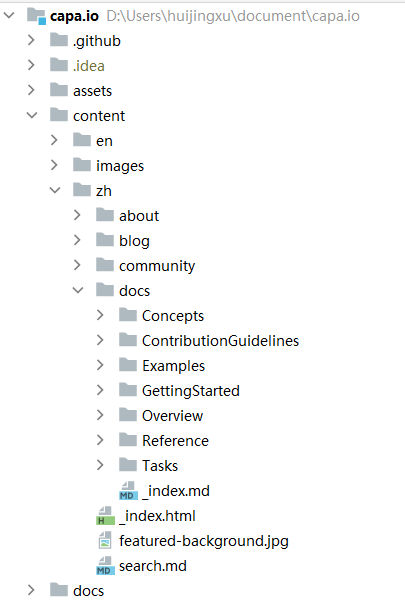
Image Path Instructions
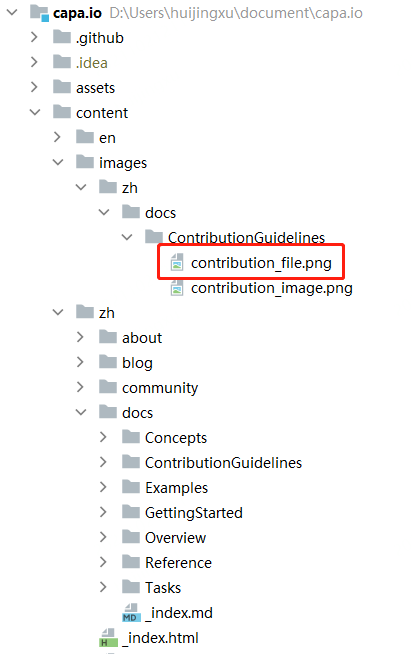
Images are uniformly placed in the content/images/ directory, with the image directory structure consistent with the directory of the referenced md file. Choose clear images that are compatible with the background.
The document uniformly uses full paths to reference images, with the URL prefix https://raw.githubusercontent.com/capa-cloud/capa.io/master/content/images.
For example, to include the image below (contribution_file.png), the Markdown syntax is as follows:

master indicates the branch namecontent/images/zh/docs/ContributionGuidelines/contribution_file.png indicates the relative path of the image